Your Google Cloud environment may be supporting your business effectively, but are you paying more than necessary to keep it running? As your cloud environments grow, unused virtual machines, oversized resources, inefficient storage configurations, unexpected network charges, and limited spending visibility can increase operating expenses.
According to Flexera’s 2026 State of the Cloud Report: The Shift from Cost Optimization to Business Value, organizations estimated that 29% of their IaaS and PaaS cloud spending was wasted. This figure highlights the importance of effective cloud financial management.
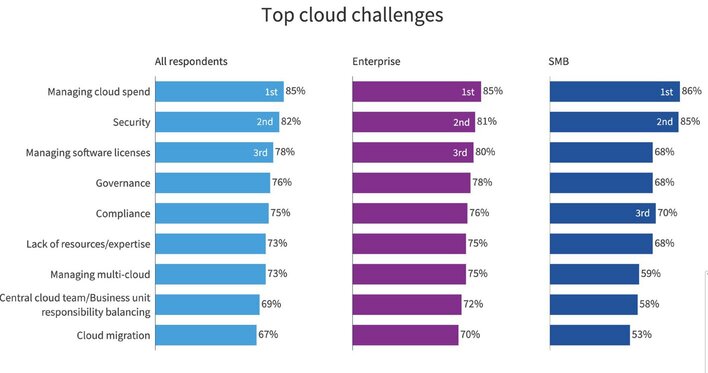
For small and medium-sized businesses (SMBs), controlling these costs is important. However, reducing spending without understanding the security implications of architectural changes can create additional business risks.
Cloud optimization should reduce waste, not the protections your business depends on.
Here are seven areas worth reviewing.
1. Are oversized cloud resources increasing your Google Cloud bill?
Deploying a Compute Engine virtual machine that is larger than necessary or remain running when not needed can generate recurring expenses without delivering additional business value.
What to look for:
- Idle development and testing environments.
- Unused persistent disks.
- Oversized compute instances.
- Virtual machines with consistently low utilization.
Recommended Actions
- Use Google Cloud Recommender and Cloud Monitoring to identify underutilized resources and evaluate rightsizing opportunities.
Technical Reference: Google Cloud – Optimize Resource Usage
2. Are you paying more than necessary for Cloud Storage?
Keeping infrequently accessed files, outdated backups, and archival data in higher-cost storage classes can increase monthly expenditure. However, deleting data or reducing backup retention without assessing business and security requirements can create recovery and compliance risks.
What to look for
- Unnecessary duplicate files.
- Infrequently accessed data stored in Standard storage
- Storage without lifecycle management.
- Backup retention policies that have not been reviewed.
Recommended Action
-
Review storage usage, access patterns, and retention requirements.
-
Use appropriate Cloud Storage classes and Object Lifecycle Management to optimize storage costs.
Learn More: Google Cloud – Object Lifecycle Management
3. Could your Google Cloud Network be costing more than necessary?
Inefficient network configurations can generate unexpected expenses through Cloud NAT processing, internet egress, inter-Region transfers, and certain cross-zone traffic patterns.
What to look for
- Large internet egress volumes.
- Unnecessary inter-Region data transfers.
- Network expenses that are difficult to attribute to applications.
- High Cloud NAT processing charges.
Recommended Action
- Review network traffic patterns alongside Google Cloud billing data.
-
Evaluate appropriate workload placement, data locality, private connectivity, and network architecture improvements.
Read More: Google Cloud – VPC Network Pricing
4. Are logging and monitoring costs properly managed?
Cloud Logging and monitoring services can generate additional expenses when organizations collect excessive low-value telemetry or retain logs longer than necessary. However, disabling essential security logs to reduce costs can weaken threat detection, incident investigation, and compliance capabilities.
What to look for
- Duplicate log collection.
- Unreviewed log retention settings.
- Excessive application debug logs.
- Monitoring configurations without clear ownership.
Recommended Action
-
Identify logs that are essential for security, troubleshooting, compliance, and business operations.
-
Review log routing, exclusions, and retention policies to reduce unnecessary ingestion and storage.
Technical Reference: Google Cloud – Cloud Audit Logs Best Practices
5. Are you making the most of Google Cloud Discounts?
Google Cloud offers several ways to lower costs, including Committed Use Discounts (CUDs) for 1- or 3-year commitments, Sustained Use Discounts (SUDs) for continuous VM usage, Spot VMs for interruptible workloads, free credits for new users, and partner perks via Startup Perks.
Organizations may pay standard rates for workloads that could benefit from committed use discounts or other pricing options. However, selecting long-term commitments without understanding usage patterns can create unnecessary expenses.
What to look for
- Commitments that exceed actual resource usage.
- No regular review of pricing recommendations.
- Workloads unsuitable for interruption running on Spot VMs.
- Predictable workloads running without an assessment of discount options.
Recommended Action
- Evaluate Committed Use Discounts for stable, predictable workloads using Google Cloud’s CUD Recommender.
-
Consider Spot VMs for suitable fault-tolerant workloads, such as batch processing, while maintaining appropriate reliability for critical services.
6. Are short-term Cloud Savings creating long-term business risks?
Some cost-reduction decisions may create business risks that outweigh their immediate savings. Disabling security monitoring, reducing essential logging, eliminating backup protections, or weakening network controls can increase exposure to cyberattacks and operational disruptions.
What to look for
- Security logs being disabled primarily to reduce costs.
- Excessive IAM permissions introduced to simplify administration.
- Architecture changes implemented without security reviews.
- Backup or disaster recovery capabilities removed without assessing business impact.
Recommended Action
-
Prioritize controls according to the sensitivity and criticality of each workload.
-
Evaluate potential cost savings alongside security, compliance, and business continuity requirements.
Technical Reference: Google Cloud Well-Architected Framework – Security Pillar
7. Do You Have Full Visibility Into Your Google Cloud Costs?
Without effective cost tracking, organizations may struggle to understand which projects, services, or workloads are responsible for increasing cloud expenditure. For SMBs operating with limited IT budgets, this can make it difficult to plan spending, prioritize investments, and identify unnecessary costs.
What to look for
- Projects without clear owners.
- No established spending budgets or alerts.
- Limited visibility into spending by application or business unit.
- Missing or inconsistent resource labels.
Recommended Action
-
Use Cloud Billing Reports, FinOps Hub, and Google Cloud Recommender to understand spending patterns and identify optimization opportunities.
-
Configure budgets and alerts, assign cost ownership, and review cloud expenditure regularly.
Read More: Google Cloud – Cloud Billing Budgets and Alerts
Top Google Cloud Cost Optimization Tools
- Google Cloud Recommender: A recommender is a service on Google Cloud that provides usage recommendations for Google Cloud resources.
- FinOps Hub: The FinOps hub presents all of your active savings and optimization opportunities in one dashboard.
- Cloud Billing Reports: Analyze cloud costs and spending patterns.
- Cloud Billing Budgets: Cloud Billing Budgets track spending against set thresholds in Google Cloud and notify you—or cap eligible services—when costs approach or exceed your limit.
- Cloud storage lifecycle management uses automated rules to transition data across storage classes or delete expired objects as its age and access patterns change
- Cloud Logging: Manage logging, routing, and retention.
- Security Command Center: Google Cloud’s centralized risk and security management platform for preventing, detecting, and responding to cloud threats and misconfigurations.
Reduce cloud spending without increasing business risk
At Reputiva, we believe cloud cost optimization and cybersecurity should work together.
For SMBs, reducing Google Cloud expenditure is not simply about choosing cheaper infrastructure or eliminating resources. It requires understanding how cloud services support business operations while maintaining appropriate security and resilience.
We recommend three priorities:
1. Eliminate unnecessary spending. Identify idle resources, optimize compute and storage configurations, and review network expenses.
2. Preserve security and business continuity. Maintain appropriate identity controls, security monitoring, data protection, and recovery capabilities during optimization.
3. Establish financial accountability. Use cloud billing insights, cost allocation, budgets, and FinOps practices to connect technology spending with business value.
The objective is not to build the cheapest cloud environment. It is to operate a secure, efficient, and financially sustainable one.
Is your Google Cloud spending delivering business value?
Your Google Cloud environment may be meeting your current business needs, but could inefficient configurations be creating unnecessary expenses?
Unused infrastructure, inappropriate resource sizing, inefficient storage, and limited financial visibility can quietly increase operating costs.
At Reputiva, we help SMBs evaluate Google Cloud architecture, identify cost optimization opportunities, strengthen cloud security, and make better cloud investment decisions.
Reduce unnecessary spending. Maintain essential protections. Maximize business value.
Book a Google Cloud Security and FinOps Assessment