Your Microsoft Azure environment may be running smoothly, but is it securely configured?
Microsoft Azure provides organizations with powerful cloud infrastructure, identity management, storage, and security capabilities. However, deploying workloads in Azure does not automatically mean those workloads are securely configured.
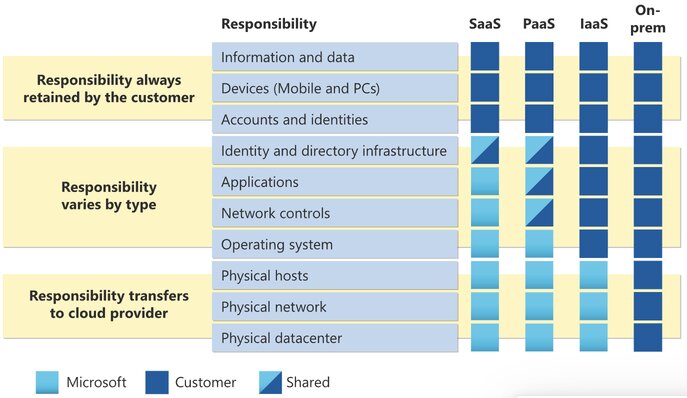
As organizations expand their cloud environments, security gaps can emerge through excessive access permissions, exposed resources, insufficient monitoring, and unmanaged credentials. These weaknesses may go unnoticed during routine operations, particularly when cloud environments evolve without regular security assessments.
For small and medium-sized businesses (SMBs), overlooking these configurations can increase the risk of unauthorized access, data exposure, operational disruption, and unexpected recovery costs.
In this article, we examine five Azure security gaps organizations may be overlooking, how to identify them, and practical steps to reduce the associated risks.
1. Excessive Permissions in Azure Role-Based Access Control (RBAC)
Azure role-based access control (Azure RBAC) is an authorization system built on Azure Resource Manager that provides fine-grained access management for cloud resources. RBAC allows organizations to manage access to cloud resources by assigning roles to users, groups, service principals, and managed identities.
However, permissions can accumulate as employees change responsibilities, projects evolve, and new applications are deployed. Users may retain privileged access long after it is needed, while applications and automation identities may receive broader permissions than their operational requirements justify.
Potential security gaps
- Former employees or contractors retaining access to Azure subscriptions.
- Privileged roles granted permanently rather than when needed.
- Role assignments that are not periodically reviewed.
- Users assigned Owner or Contributor roles without a clear business need.
Recommended Actions
- Apply the principle of least privilege by granting only the permissions necessary to perform authorized tasks.
- Establish processes for reviewing access when employees change roles or leave.
- Regularly review Azure RBAC role assignments and remove unnecessary access
2. Azure Storage Accounts With Inadequate Access Restrictions
Azure Storage is commonly used to store business documents, application data, backups, logs, and other critical information. Although Azure provides security controls for protecting stored data, inappropriate configurations can expose sensitive information.
When an account permits anonymous access and a container is configured to allow it, data may become accessible without authentication.
Potential Security Gaps
- Containers configured for public read access without a business requirement.
- Shared Access Signatures (SAS) with excessive permissions or long validity periods.
-
Storage resources accessible from broader networks than necessary.
Recommended Actions
- Disable anonymous blob access unless there is a documented business requirement.
- For applications requiring delegated access, use appropriately scoped, short-lived SAS tokens and establish procedures for revoking access.
Resources: Azure Blob Storage Security Recommendations
3. Azure resources exposed to the public internet
Cloud resources often require network connectivity to support applications, remote administration, and business operations. However, unnecessary public exposure increases the number of potential entry points available to attackers.
Potential Security Gaps
- Virtual machines exposing RDP or SSH directly to the internet.
- Network Security Group (NSG) rules allowing unrestricted inbound access.
- Databases configured with unnecessarily broad network access.
- Unused public IP addresses or exposed endpoints.
Recommended Actions
- Review network configurations regularly and restrict inbound connectivity to approved sources and required ports.
- Apply network segmentation and periodically review public IP addresses, firewall rules, and NSG configurations.
Resource: Security Best Practices for Azure IaaS Workloads
4. Insufficient Logging and Security Monitoring
Security events can occur without immediately affecting application performance or availability. Unauthorized changes, suspicious access attempts, and unusual resource activity may remain undetected when logging and monitoring are not properly configured.
Azure provides several monitoring capabilities, including Azure Monitor, Activity Logs, diagnostic settings, and Microsoft Defender for Cloud.
Potential Security Gaps
- No alerts for suspicious administrative activities.
- Critical security recommendations remaining unresolved.
- Security logs not being collected or retained appropriately
- Diagnostic settings missing on critical Azure resources.
Recommended Actions
- Configure alerts for high-risk activities, including unexpected administrative changes, and establish processes for reviewing security findings.
- Use Microsoft Defender for Cloud to assess security posture, identify relevant recommendations, and prioritize remediation.
- Logging should support both early threat detection and incident investigation.
Resource: Diagnostic Settings in Azure Monitor
5. Unmanaged Secrets and Long-Lived Credentials
Applications, automation scripts, and cloud integrations often require credentials to access Azure resources and external services. These credentials may include application secrets, API keys, connection strings, certificates, and service principal credentials.
Over time, credentials may remain active after applications are retired, integrations are replaced, or employees leave an organization. Secrets stored in configuration files, source code, or scripts can also create unnecessary exposure if those files are accessed or shared improperly.
Potential Security Gaps
- Long-lived credentials without appropriate rotation practices.
- Secrets shared across multiple applications or environments.
- Service principal credentials remaining active after applications are decommissioned
- Application secrets stored directly in source code or configuration files.
Recommended Actions
- Use Azure Key Vault to manage secrets, keys, and certificates securely.
- Review application credentials regularly, remove credentials that are no longer required, and establish appropriate rotation and expiration policies.
- Restrict access to secrets using least-privilege permissions and monitor sensitive operations.
Azure Security requires continuous attention
Azure provides a strong foundation for building secure cloud environments, but maintaining security requires more than enabling default protections. As organizations deploy new applications, expand their infrastructure, and introduce automation, their security configurations must evolve accordingly.
At Reputiva, we believe SMBs should prioritize five essential cloud security practices:
-
Strengthen identity and access management: Apply least-privilege access, review privileged role assignments, and remove unnecessary permissions.
-
Protect sensitive cloud data: Restrict public access to storage resources and implement appropriate authorization controls.
-
Improve security visibility: Enable relevant logging, configure actionable alerts, and regularly review security findings.
-
Reduce unnecessary exposure: Secure internet-facing resources, restrict management access, and apply network segmentation.
-
Manage credentials securely: Use managed identities where possible, protect secrets, and remove unused credentials.
Organizations do not necessarily need more security tools. They need better visibility into their existing configurations, clearer ownership of security responsibilities, and consistent processes for identifying and addressing risks.
Is Your Azure Environment Securely Configured?
Reputiva helps small and medium-sized businesses identify cloud security gaps, strengthen identity and access controls, and improve their overall Azure security posture.
Our cloud security assessments provide practical recommendations aligned with organizational risks, operational requirements, and business priorities.
Identify security gaps. Strengthen your Azure environment. Reduce unnecessary risk.