According to the SANS 2026 Cloud Security Survey, misconfigurations accounted for 45% of reported critical cloud security incidents, compared with 22% attributed to credential theft. Similarly, Red Hat’s 2026 State of Cloud-Native Security Report found that 78% of surveyed organizations experienced cloud infrastructure misconfigurations during the preceding 12 months.
These findings highlight an important challenge: organizations can deploy workloads successfully while overlooking security configurations that expose identities, data, networks, and critical business systems. For small and medium-sized businesses (SMBs), the consequences can include unauthorized access, data exposure, operational disruption, and increased remediation costs.
The question is not simply whether your AWS environment is running, but whether its security configurations are protecting your business as intended.
What is Cloud Misconfiguration?
According to the Cloud Security Alliance (CSA) Top Threats to Cloud Computing 2026 report:
Misconfiguration is the incorrect configuration of cloud and AI systems, often caused by inadequate change control. It results in unintended data exposure that organizations mostly discover after the fact, not before. The most common causes are identities with too many permissions and misconfigured storage. Inadequate logging means the exposure often goes undetected until an incident forces a review.
The Cloud Security Alliance identifies misconfiguration as one of the most significant cloud security threats — typically caused by human error, lack of knowledge, or failure to follow security best practices.
Your AWS environment may be running smoothly. Your applications are accessible, your workloads are performing as expected, and your cloud infrastructure continues to support daily business operations. But are your AWS security configurations protecting your business as intended?
As organizations expand their cloud environments, new resources are deployed, permissions are granted, networking rules change, and security configurations evolve. Without regular reviews, these changes can introduce misconfigurations that expose sensitive information, expand attack surfaces, and make security incidents harder to detect.
For small and medium-sized businesses (SMBs), the consequences can extend beyond technical disruptions to include financial losses, operational downtime, regulatory exposure, and reputational damage.
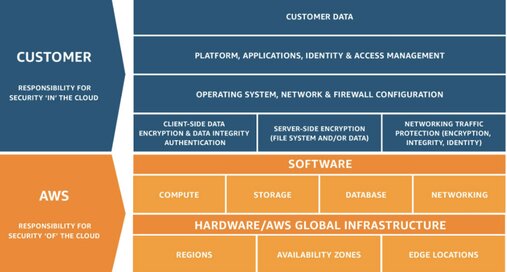
AWS Shared Responsibility Model
AWS provides numerous security controls, but organizations remain responsible for configuring many of those controls appropriately under the AWS Shared Responsibility Model.
AWS is responsible for protecting the infrastructure that runs all of the services offered in the AWS Cloud. This infrastructure is composed of the hardware, software, networking, and facilities that run AWS Cloud services. Customer responsibility will be determined by the AWS Cloud services that a customer selects. This determines the amount of configuration work the customer must perform as part of their security responsibilities.
A cloud environment can be operational, highly available, and still contain security weaknesses.
Here are five AWS security misconfigurations that deserve your attention.
1. Excessive IAM Permissions and Privileged Access
AWS Identity and Access Management (IAM) controls who or what can access AWS resources and what actions they can perform. Over time, users, applications, and service roles may accumulate more permissions than necessary.
Privilege creep is the gradual accumulation of access rights beyond what a user needs for their assigned job functions
AWS Security Hub CSPM specifically includes controls addressing IAM policies that grant unrestricted administrative privileges.
Key Security Risks to Review
- Unused IAM identities and credentials.
- Users and roles with permissions beyond their responsibilities.
- IAM policies granting unrestricted administrative privileges.
- Long-term access keys that are no longer required.
- Missing MFA protections for human users.
Recommended Actions
- Review IAM users, roles, policies, and access patterns.
- Apply the principle of least privilege and use temporary credentials wherever appropriate.
- Use IAM Access Analyzer to identify unused or unintended access, and review privileged role assignments regularly.
Resources: AWS IAM Security Audit Guidelines | IAM Access Analyzer
2. Publicly Accessible S3 Buckets and Weak Storage Permissions
Amazon Simple Storage Service (S3) provides scalable storage for backups, application data, documents, and other business information. However, overly permissive bucket policies, access point configurations, or access control settings may expose information to unauthorized parties.
AWS provides S3 Block Public Access capabilities to help prevent unintended public exposure. AWS also recommends checking bucket policies for wildcard principals when public access is not required.
Key Security Risks to Review
- Bucket policies permitting unintended public access.
- S3 buckets without appropriate Block Public Access settings.
- Excessive object permissions.
- Sensitive storage resources without appropriate monitoring.
- Publicly exposed backups or exported data.
Recommended Actions
- Review S3 bucket policies, access points, resource permissions, and intended sharing requirements.
- Enable appropriate S3 Block Public Access settings and use IAM Access Analyzer for S3 to identify resources accessible outside their intended boundaries.
AWS Resource: AWS Security Hub S3 Controls
3. Overly Permissive Security Groups and Network Access
AWS security groups act as virtual firewalls that control network traffic to supported cloud resources. Misconfigured security groups can unintentionally expose administrative ports, databases, or internal applications to the internet.
AWS recommends restricting access to trusted sources and limiting unnecessary internet exposure.
Key Security Risks to Review
- Security group rules allowing unnecessary inbound access from
0.0.0.0/0or::/0. - Unused security groups and outdated network rules.
- Publicly accessible administrative ports.
- Unexpected public IP addresses assigned to workloads.
- Network access that no longer matches business requirements.
Recommended Actions
- Review security group rules and eliminate unnecessary internet-facing access.
- Restrict administrative connectivity, use AWS Systems Manager Session Manager where appropriate, and segment sensitive resources within private networks.
Resources: AWS VPC Security Groups | AWS Security Hub EC2 Controls
4. Inadequate CloudTrail Logging and Security Monitoring
Without appropriate logging and monitoring, security teams may struggle to identify unauthorized changes, investigate compromised identities, or reconstruct events during an incident. Organizations need sufficient visibility into activities taking place across their AWS accounts.
AWS Security Hub CSPM includes controls for CloudTrail coverage, management events, log validation, and related security configurations.
Key Security Risks to Review
- Missing or insufficient security alerts.
- Inadequate logging for sensitive resources.
- Incomplete CloudTrail coverage across AWS accounts and Regions
- Logs with insufficient retention periods.
- Unprotected CloudTrail log storage.
Recommended Actions
- Establish an appropriate CloudTrail logging strategy across accounts and Regions.
- Use Amazon GuardDuty, Amazon CloudWatch, and AWS Security Hub to support security detection, visibility, and response.
Resources: AWS CloudTrail · CloudTrail Security Controls
5. Inadequate Encryption and Data Protection Controls
AWS offers encryption capabilities across services such as Amazon S3, Amazon EBS, and Amazon RDS. However, organizations still need to review encryption configurations, key permissions, data classification, and access controls to ensure sensitive information is adequately protected.
Amazon S3 automatically encrypts new objects by default using server-side encryption with S3-managed keys. The security review should therefore go beyond checking whether basic S3 encryption is enabled.
Key Security Risks to Review
- Storage resources without appropriate encryption protections.
- Excessively permissive AWS KMS key policies.
- Unintentionally shared EBS or database snapshots.
- Inadequate encryption key management and monitoring.
Recommended Actions
- Review encryption settings across services and workloads, including data at rest and in transit.
- Evaluate AWS KMS permissions, key rotation requirements, public snapshot exposure, and access to sensitive data.
Resources: AWS Well-Architected — Data Protection | AWS Data Protection Security Controls
AWS Assessment and Diagnostic Tools
AWS provides several native services to help organizations identify configuration weaknesses, monitor security activity, and evaluate cloud security posture.
AWS Security Hub CSPM (Cloud Security Posture Management)
AWS Security Hub CSPM (Cloud Security Posture Management) is a native AWS service that continuously evaluates your cloud environment against security best practices and compliance standards.
Security misconfigurations and compliance with supported security standards
AWS Config
AWS Config is a fully managed Amazon Web Services (AWS) service that continuously monitors, records, and evaluates the configurations of your cloud resources.
Resource configuration changes and compliance against defined rules
IAM Access Analyzer
AWS Identity and Access Management Access Analyzer helps you to set, verify, and refine your IAM policies by providing a suite of capabilities.
Unintended access, unused permissions, and policy issues
Amazon GuardDuty
Amazon GuardDuty is a fully managed threat detection service that continuously monitors your AWS accounts, workloads, and data for malicious activity and unauthorized behavior.
Potentially malicious and suspicious activities
AWS CloudTrail
AWS CloudTrail is an Amazon Web Services (AWS) governance and security service that automatically records user activity, role actions, and API calls across your cloud infrastructure.
API activity, account changes, and audit records
Amazon Inspector
Amazon Inspector is an automated vulnerability management service from Amazon Web Services (AWS) that continuously scans cloud workloads for software flaws and network risks.
Supported EC2, container image, and Lambda vulnerability assessments
AWS Trusted Advisor
AWS Trusted Advisor is an automated online tool that inspects your cloud environment and gives you real-time guidance to follow AWS best practices.
Selected security, reliability, and configuration recommendations
AWS Security Misconfiguration Review Checklist
Before assuming your AWS environment is adequately secured, review these areas.
[ ] Review excessive IAM permissions and administrative access
[ ] Verify MFA for human identities and root-user protections
[ ] Identify unnecessary long-term credentials
[ ] Assess S3 Block Public Access and bucket policies
[ ] Review external access to S3 resources
[ ] Identify overly permissive security groups
[ ] Review exposed administrative ports and databases
[ ] Verify CloudTrail coverage and security alerting
[ ] Assess encryption, KMS permissions, and snapshot sharing
[ ] Review AWS Security Hub CSPM findings and remediation ownership
Cloud Security Requires More Than Default Configurations
At Reputiva, we believe that securely operating in the cloud requires more than deploying workloads and enabling security services.
AWS provides extensive security capabilities, but organizations must ensure those controls are appropriately configured, consistently monitored, and aligned with business requirements.
We encourage SMBs to prioritize three areas:
1. Reduce unnecessary exposure. Apply least privilege, restrict public access, and secure internet-facing cloud resources.
2. Improve visibility and detection. Use cloud-native assessment, logging, and monitoring tools to identify configuration weaknesses and suspicious activity.
3. Establish continuous security governance. Regularly review resource configurations, validate security controls, and prioritize remediation based on business impact.
A cloud environment that works is not necessarily a cloud environment that is secure.
Take the Next Step
When was your AWS environment last reviewed for security misconfigurations?
Reputiva helps small and medium-sized businesses assess AWS security configurations, identify potential vulnerabilities, and develop practical remediation roadmaps aligned with their operational needs and budgets.
Whether your organization is operating a few cloud workloads or managing multiple AWS accounts, understanding your security posture is essential to reducing unnecessary risk.