Your website is often the first point of contact between your business and potential customers. It helps establish credibility, generate leads, facilitate transactions, and deliver essential services. Other functions of a website may include marketing, brand building, customer support, and information dissemination, among others. But how secure is your WordPress website?
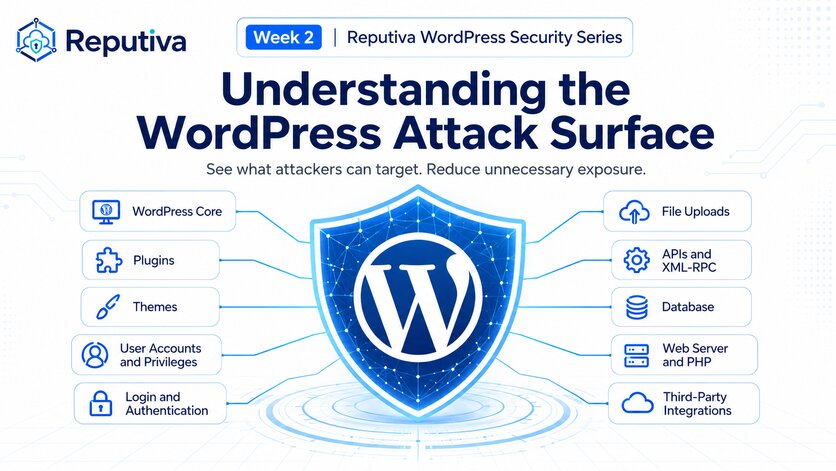
WordPress powers a significant portion of the web, and this popularity makes it a frequent target for attackers. WordPress supports a vast ecosystem of themes, plugins, hosting providers, developers, and third-party integrations. Its flexibility, extensive plugin ecosystem, and ease of use make it particularly attractive to small and medium-sized businesses (SMBs). This creates a large attack surface.
WordPress.com reports that WordPress powers over 43% of the internet and commands a 61.4% share of the content management system market, more than all other CMS platforms combined.
A WordPress site may look normal while running outdated plugins/themes, exposing administrative accounts, or lacking adequate backup and recovery measures. Indicators of Compromise (IoCs), such as unexpected redirects, unusual performance issues, or unauthorized website changes, may signal that attackers have already gained access to your website.
Website security is not simply about keeping your site online. It is about protecting customer trust, business information, and operational continuity.
Here are seven warning signals that your WordPress website may have security gaps and practical steps you can take to address them.
1. Outdated WordPress Core, Plugins, or Themes
A WordPress website typically relies on three major software components: The Core Software (WordPress Core), Design and Layout (Themes) and Functionality Extensions (Plugins) Each can contain vulnerabilities that attackers may exploit when security patches are not applied.
Abandoned or unsupported plugins are particularly concerning because newly discovered vulnerabilities may never receive security fixes.
Warning Signs:
-
Pending updates for WordPress, plugins, or themes.
-
Plugins that have not been maintained or updated in a long time.
-
Installed plugins or themes that are no longer actively used.
-
Unsupported PHP versions or compatibility warnings.
Recommended Actions
Regularly review and apply security updates, back up regularly, and test significant changes after creating a backup. Remove unused components, replace unsupported plugins, and establish a consistent patch-management process.
2. Weak Passwords and Missing Multi-Factor Authentication (MFA)
The administrator role is the highest default permission level in WordPress. It provides powerful access to website settings, content, plugins, and user management.
If attackers compromise an administrator account, they may modify website content, install malicious software, create additional accounts, or steal sensitive information.
Passwords alone may not protect against phishing, credential reuse, and automated login attacks.
Reference: WordPress Security Hardening Guide
Warning Signs
- Reused or easily guessable passwords.
- Shared credentials among employees or external contractors.
- No MFA for privileged accounts.
- Administrator accounts protected only by passwords.
- Unrestricted login attempts without appropriate monitoring or protections.
Recommended Actions
Require MFA for administrator accounts, use unique passwords generated by a password manager, eliminate shared logins, and monitor suspicious authentication activity.
Reference: CISA – Use Strong Passwords
3. Excessive User Permissions
WordPress includes several user roles, including Administrator, Editor, Author, Contributor, and Subscriber. Each provides different levels of access.
Giving users more permissions than they need increases the potential impact of account compromise, accidental changes, or insider misuse.
Warning Signs
- Unrecognized usernames or email addresses.
- Multiple administrator accounts without a clear business justification
- No established process for reviewing access.
Recommended Actions
Apply the principle of least privilege by giving each user only the permissions necessary for their responsibilities.
Reference: WordPress Roles and Capabilities
4. Limited Security Monitoring and Website Protection
Without appropriate security monitoring, suspicious login attempts, unauthorized file changes, malicious requests, and other indicators of compromise may go unnoticed.
A Web Application Firewall (WAF) is a specialized security system that protects web applications and APIs by filtering, monitoring, and blocking malicious HTTP and HTTPS traffic.
Warning Signs
- No visibility into failed administrator login attempts.
- Security plugins installed but not properly configured or maintained.
- No documented process for reviewing or responding to security alerts.
Recommended Actions
Enable appropriate security logging and alerting, consider a properly configured WAF, and regularly review security events.
5. Missing, Outdated, or Untested Website Backups
Backups are a critical component of business continuity and cyber resilience. However, simply enabling an automated backup tool does not guarantee that your website can be recovered.
Backups may be incomplete, corrupted, inaccessible, or compromised alongside the production environment.
Warning Signs
- Backups stored only on the production hosting environment.
- No automated website and database backups.
- Website backups that have never been tested.
- No documented restoration procedure.
Recommended Actions
- Establish automated backups for website files, databases, and critical configuration.
- Define recovery objectives that reflect how long your business can tolerate website downtime and data loss.
6. Insecure Website Configuration
Security misconfigurations may include overly permissive file permissions, exposed sensitive files, insecure administrative access, or outdated server-side software.
These weaknesses can create opportunities for attackers to access information, modify website files, or escalate privileges.
Warning Signs
- HTTPS not consistently enforced across the website.
-
Sensitive configuration files or backups accessible through the web.
-
Outdated or unsupported PHP versions.
- Incorrect file or directory permissions.
Recommended Actions
Review your hosting and WordPress security configurations, enforce HTTPS, restrict access to sensitive files, and disable unnecessary functionality.
Consider periodic configuration reviews against recognized WordPress hardening and web application security guidance.
Unexpected redirects, unfamiliar administrator accounts, unexplained file changes, or unusual resource consumption can indicate that a website may already be compromised. Attackers sometimes inject malicious scripts, redirect visitors to fraudulent websites, or use compromised hosting resources for unauthorized activities.
Some website security weaknesses remain hidden until attackers exploit them.
Performance degradation and broken functionality can also result from legitimate configuration problems, plugin conflicts, or infrastructure limitations.
Warning Signs
- Visitors unexpectedly redirected to unfamiliar websites.
- Unknown pages, advertisements, or links appearing on your site.
- New administrator accounts you did not create.
- Search engines or browsers displaying malware warnings.
Recommended Actions
Investigate unexpected activity promptly. Review authentication logs, website files, administrator accounts, and hosting activity.
Reference: Wordfence – If Your Site Is Hacked
Website Security is a business risk, not just an IT issue
For many SMBs, a WordPress website is more than a digital storefront. It supports customer engagement, lead generation, business transactions, and brand credibility.
A successful cyberattack can disrupt these activities, expose sensitive information, create recovery costs, and damage customer confidence.
At Reputiva, we believe effective website security requires more than installing a security plugin or occasionally updating WordPress.
Organizations should focus on five priorities:
-
Reduce preventable vulnerabilities: Maintain supported software, patch known weaknesses, and remove unnecessary plugins and services.
-
Strengthen identity and access security: Require MFA for privileged accounts, enforce least privilege, and regularly review user access.
-
Improve visibility and threat detection: Implement appropriate logging, website protection, monitoring, and incident response procedures.
-
Build operational resilience: Maintain secure, tested backups and documented recovery procedures.
-
Assess security regularly: Review website configurations, hosting infrastructure, third-party integrations, and emerging risks.
The goal is not to eliminate every possible risk, but to identify and address security weaknesses before they become costly business incidents.
How Secure Is Your WordPress Website?
Is your WordPress website properly configured, maintained, and protected against common cyber threats?
Reputiva helps small and medium-sized businesses identify security gaps, strengthen access controls, assess cloud and hosting infrastructure, and improve cybersecurity resilience.
Book a cybersecurity consultation with Reputiva to identify your website’s potential security weaknesses and take practical steps to protect your business.